Skydio Defense UI Inventory
A component library broken out of Skydio's public product screenshots for ISR Command, Security Command / Flight Deck, Base Security, Border Security, and the X10D controller. Each component is rebuilt in HTML/CSS so the anatomy is inspectable, with the screen it came from listed underneath.
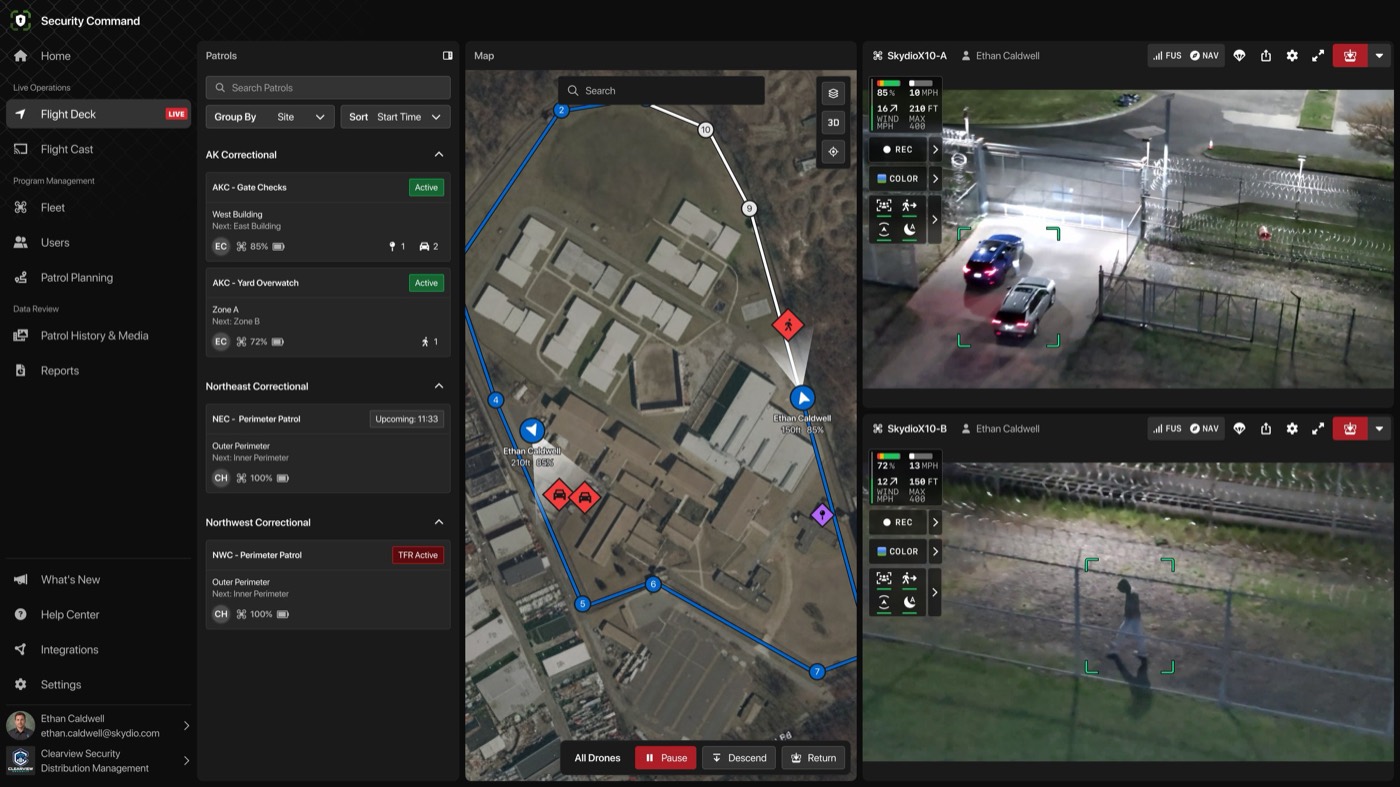
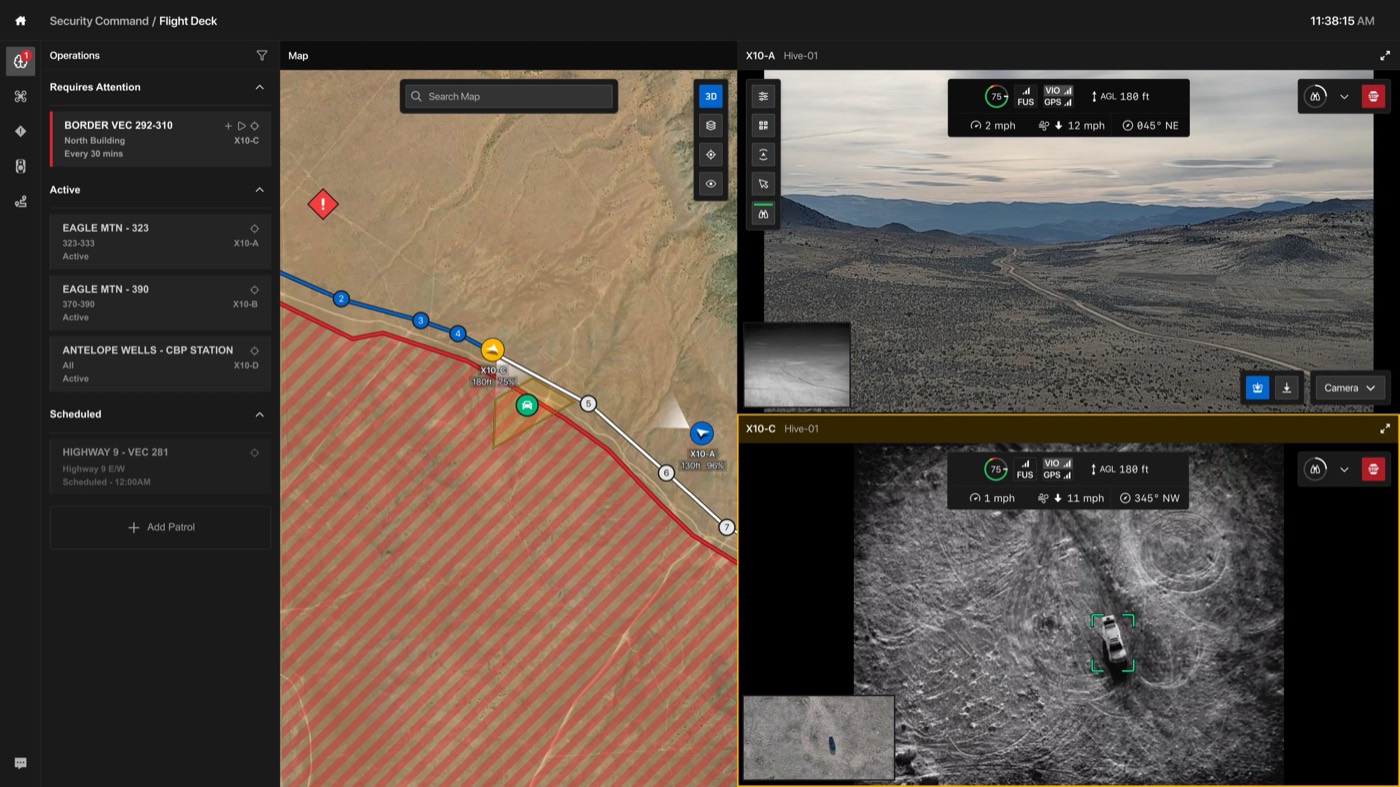
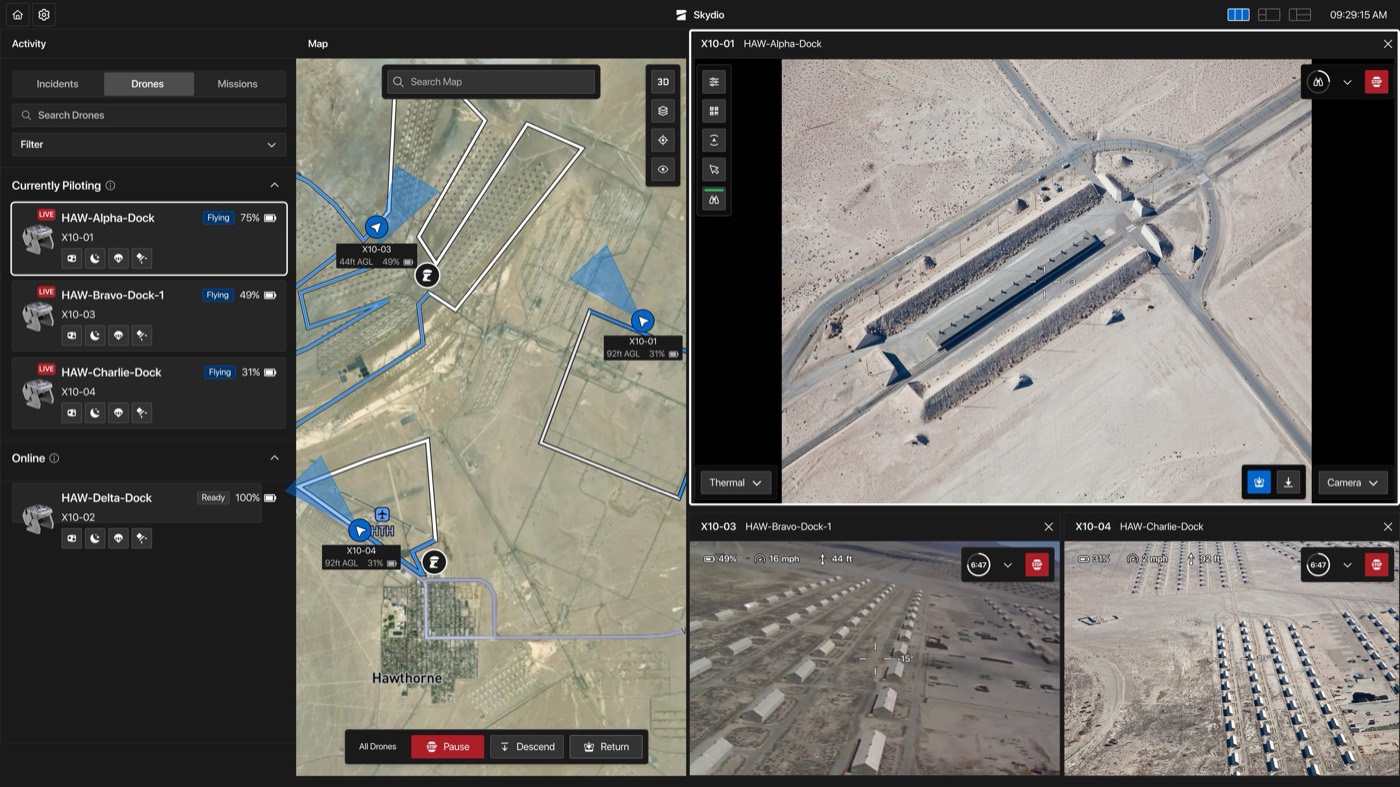
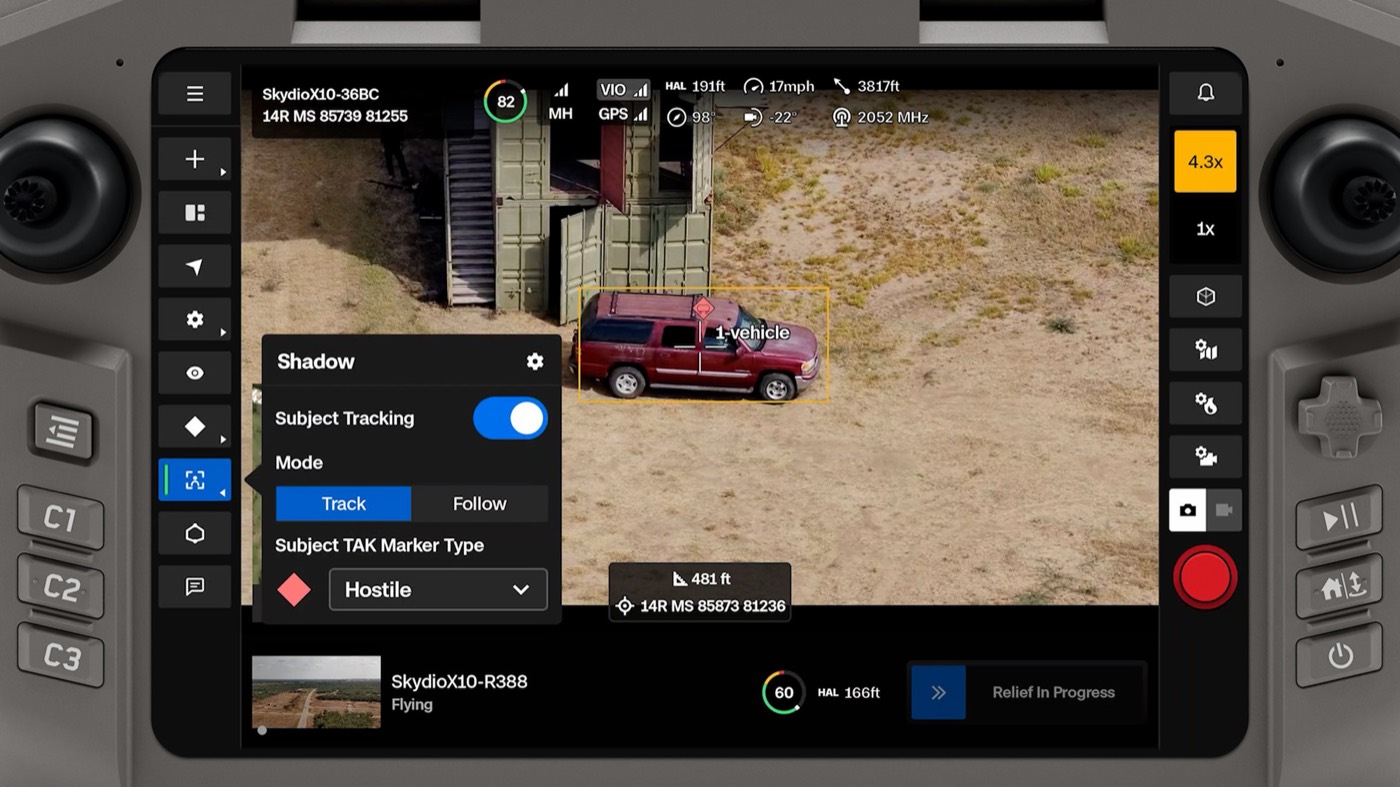
00Source screens
Marketing renders from skydio.com, pulled 9 Nov 2026. Full-resolution copies of all 23 screens are in interview-prep/skydio-defense-screens/.
01Foundations
Near-black, low-chroma surfaces stepped by lightness, with color held back for meaning: blue for "ours / selected / go", red for "stop / hostile / live", green for "healthy / tracked". Amber marks whatever the operator is focused on right now.
Surface ramp neutral
Five steps, each roughly +4–6% lightness. Panels separate by fill, rarely by border, which keeps a four-pane screen from looking caged.
Semantic color signal
No brand accent shows up inside the product. Every saturated color carries operational meaning, and red is reserved for things that interrupt the operator.
Affiliation palette MIL-STD-2525
Imported from the TAK ecosystem as-is, not restyled. That keeps a Skydio marker readable to anyone on the same TAK server.
Type roles 3 voices
A neutral grotesk for the app, a monospace for machine-generated numbers on video, and a wide-tracked mono for TAK messages. Uppercase marks system-authored text such as alert titles and work-order names.
02Shell & navigation
The desktop app is a fixed four-column frame: nav, list, map, video. Everything below lives inside one of those columns.
Side nav, expanded NavRail
- Grouped by job: Live Operations / Program Management / Data Review
- Active row gets a surface-3 fill; a LIVE tag rides on the item while a flight is up
- Footer holds user + org switcher (tenant name and logo)
Side nav, collapsed NavRail.compact
- Icon-only, 36px targets; count badge for unread operations
- Used when the map and feeds need the width (border corridor view)
Top bar AppHeader
- Breadcrumb product / module, live clock with seconds at the right edge
- Variant carries a video-layout switcher (1-up, 2-up, grid)
Panel & section headers PanelHeader / Collapsible
- Pane title + one utility action (collapse pane, filter)
- Collapsible group header groups by site or by state: Requires Attention, Active, Scheduled
03Inputs & status
Square-ish controls (2–4px radius) on surface-3. Status lives in small rectangular badges, never pills.
Search + query selects ListControls
- Label-in-field select ("Group By · Site") saves a row of vertical space
Segmented control Segmented
- Neutral variant switches list content
- Blue variant switches a flight behavior: a mode change the aircraft will act on
Toggle & status select Switch / StatusSelect
- Toggles are large (52×28) for gloved touch on the controller
- Response status is a select, so ownership changes are one tap
Status badges Badge
- Patrol lifecycle: Upcoming → Active, with TFR Active as an airspace override in red
- Aircraft state: Ready / Flying; LIVE marks a streaming feed
- Time chips: scheduled start, and an elapsed-since-alert counter
04Lists & cards
The left list is where the operator triages. Each card type answers "what is it, is it OK, and what's next" in three rows.
Patrol card PatrolCard
- Header: patrol name + lifecycle badge
- Body: current waypoint, next waypoint
- Footer: pilot initials, aircraft battery, then detection counts by class (POI, vehicle, person)
Operation row OperationItem
- Red left stripe = Requires Attention; scheduled rows render at reduced opacity
- Inline actions: add, start, locate on map
- Assigned aircraft right-aligned (X10-C)
Dock / drone row AssetItem
- Named by dock (HAW-Alpha-Dock), with the airframe ID as subtitle
- Quick actions without opening the feed: camera, night mode, strobe, locate
- Selected row = full-white 1.5px outline, matching the focused video tile
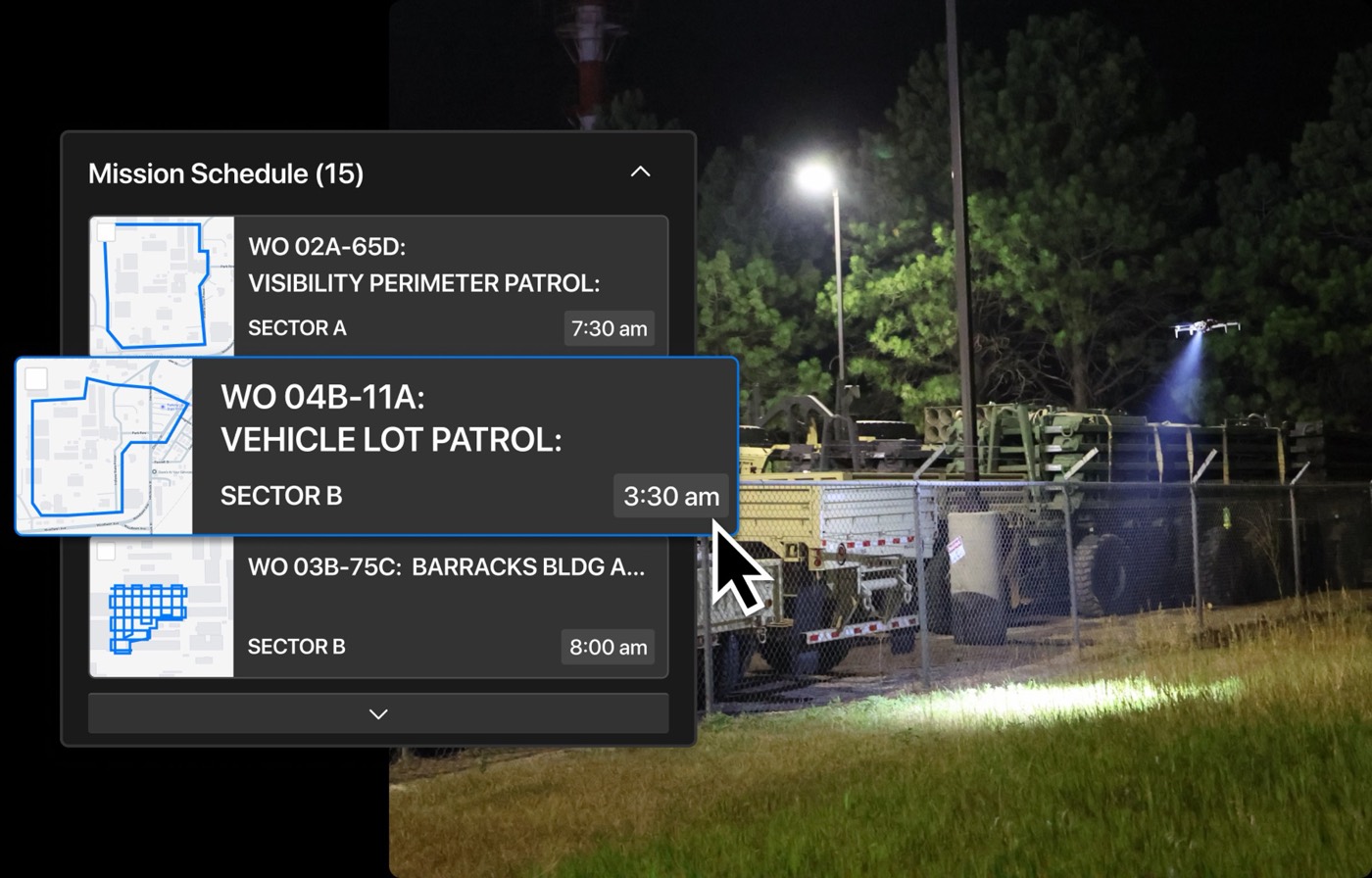
Mission schedule item MissionItem
- Route thumbnail on a light basemap so the shape reads at a glance
- Work-order ID + mission name in caps (military tasking vernacular)
- Sector + start time; selection = blue outline and scale-up
05Map layer
Satellite basemap, drawn over with high-contrast, white-stroked symbols so they hold up against any terrain.
150ft 85%
180ft 75%
Aircraft marker DroneMarker
- Heading arrow inside a white-ringed disc, plus a translucent camera FOV cone
- Label: pilot or callsign, altitude, battery
- Amber fill = the aircraft whose feed is focused
Waypoints & dock RouteMarker
- Blue = flown leg, white = upcoming leg; the polyline color matches
- Dock/base shown as a black disc with the Skydio mark
Detection & alert markers EventMarker
- Diamond = event; glyph = class (person, vehicle)
- Purple = operator-dropped POI; "!" = unassigned alert
- Same shapes TAK uses for hostile, so the two read as one family
TAK affiliation markers CoTMarker
- Hostile diamond, friend rectangle, unknown quatrefoil, neutral square
- Shared both ways with the TAK server as Cursor-on-Target
Map controls MapToolbar
- Floating search top-center; vertical tool stack top-right
- 3D toggle, layers, recenter on aircraft, visibility filters
Fleet command bar FleetActions
- Docked bottom-center of the map; scope label at left ("All Drones")
- Pause is the only filled red button: the universal safe stop
06Video & HUD
Each feed is a self-contained cockpit: identity bar on top, telemetry and camera controls floated over the video.
Video tile FeedTile
- Header: aircraft name, pilot or dock, link health (FUS = fused radio, NAV), share, settings, fullscreen
- Red return-to-home sits at the far right, apart from the neutral icons
- Focused tile: 2px amber border and amber-tinted header, matching its amber map marker
Telemetry block + camera stack HUD.compact
- 2×2 mono grid: battery, ground speed, wind, altitude against the 400 ft ceiling
- Stack: record, sensor (COLOR / THERMAL), AI detection toggles; each row expands sideways
- Green underline = that detector is on
Flight status strip HUD.full
- Battery ring (green with red reserve slice), radio (MH = mesh), nav sources VIO + GPS shown separately
- HAL = height above launch, heading, speed, gimbal pitch, distance, radio frequency
- VIO gets its own chip because GPS-denied flight is a selling point
On-video detection Reticle / BoundingBox
- Corner-bracket reticle in mint = AI lock on a subject
- Amber box + class label = tracked subject, with its TAK marker pinned on top
- Class tags for person / vehicle / animal (animal flagged amber to suppress false alarms)
Feed footer & corner controls FeedControls
- Sensor and camera pickers bottom corners, RTH + save clip between
- Top-right: remaining flight time ring and an octagonal STOP
Payload & sharing AttachmentBar / StreamShare
- Attachment rail for speaker, spotlight, etc. with hover tooltips
- Share sheet: QR + expiring link so a commander can watch on a phone
07Controller (X10D handheld)
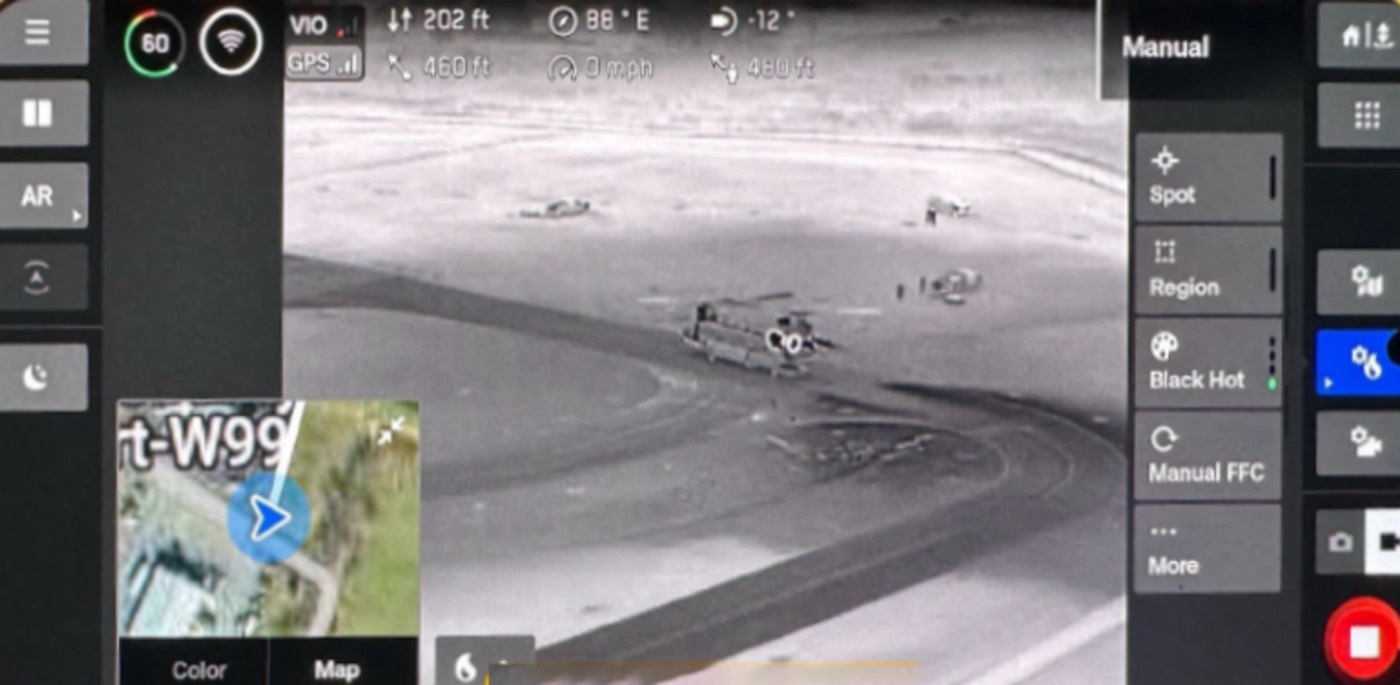
Same visual language, re-cut for a 7" screen, gloves and sun. Targets grow to ~44px, labels shrink to icons, and every tool sits on a screen edge next to a thumb.
Tool rail + flyout ToolRail / Flyout
- Left-edge rail; a small caret marks tools that open a flyout
- Active tool: blue fill with a mint indicator bar
- Flyout groups one feature's settings; here a tracked subject is published to TAK as Hostile
Right-edge capture column CaptureRail
- Zoom presets with the live value in amber
- Photo / video toggle above a large shutter (red disc = idle, white square = recording)
Thermal menu + target readout ThermalMenu / TargetReadout
- Radiometric tools: spot and region temperature, palette (Black Hot), flat-field correction
- Center readout: slant range and MGRS grid of whatever is under the crosshair
Relief handoff bar ReliefBar
- Shows the incoming aircraft (thumbnail, state, battery, altitude) while the current one holds the target
- Handoff state as a progress control; overwatch continues without a gap
08ISR Command / TAK layer
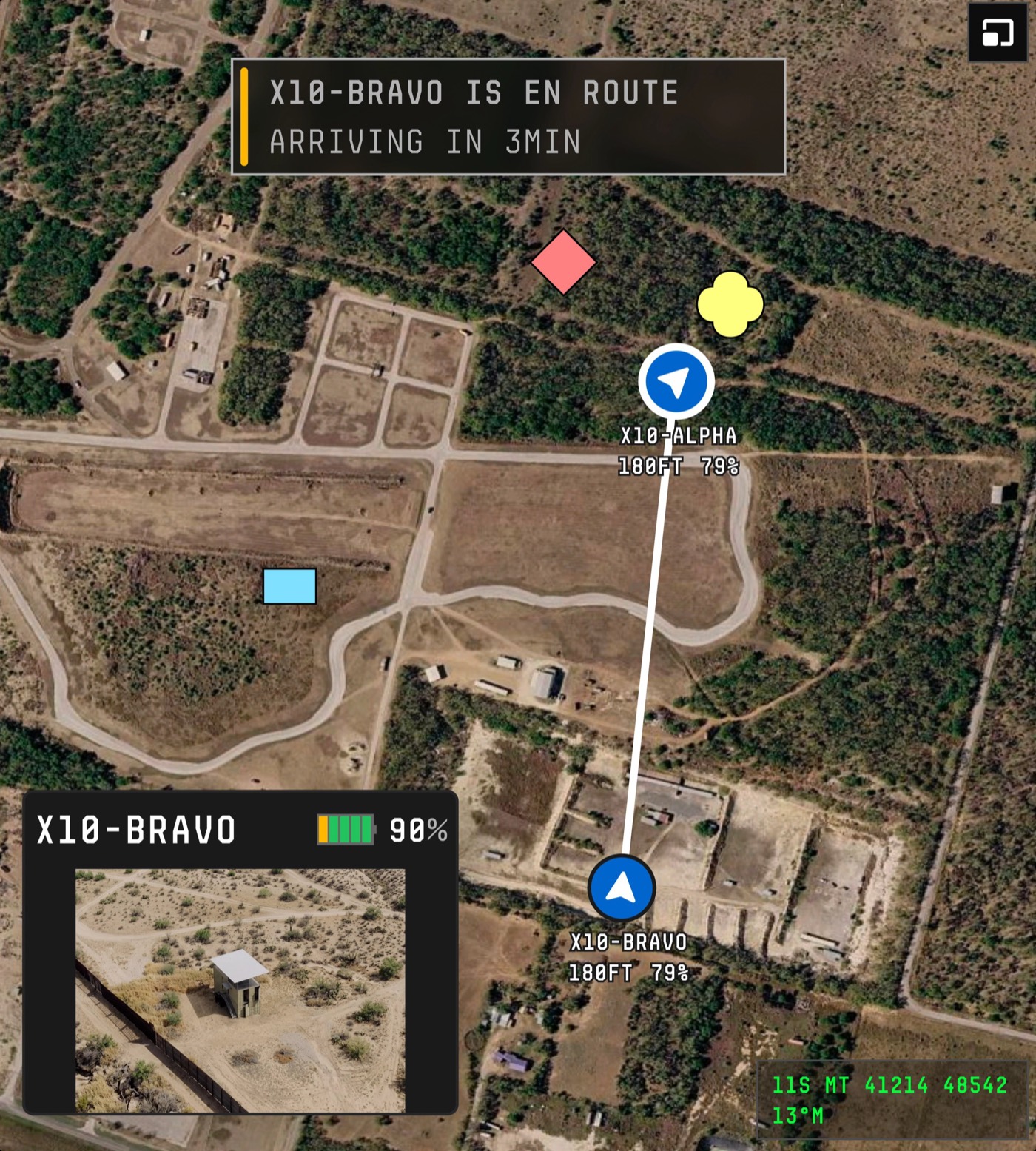
When Skydio speaks into TAK, it adopts TAK's look: monospace caps, MGRS everywhere, affiliation symbols. This is a deliberate second dialect, not drift.
Mission toast IsrToast
- Colored left bar for urgency (amber = info/ETA, red = action needed)
- Written as status reports, with an ETA or deadline in the second line
13°M
Picture-in-picture + MGRS readout PipCard / GridReadout
- Inset feed with segmented battery, sitting on the TAK map
- Green-on-black MGRS + magnetic heading, the format soldiers call over radio
180ft 79%
180ft 79%
Relief tether ReliefLink
- A straight white line joins the outgoing and incoming aircraft
- Callsign labels switch to TAK mono on this surface
09Alerts & incidents
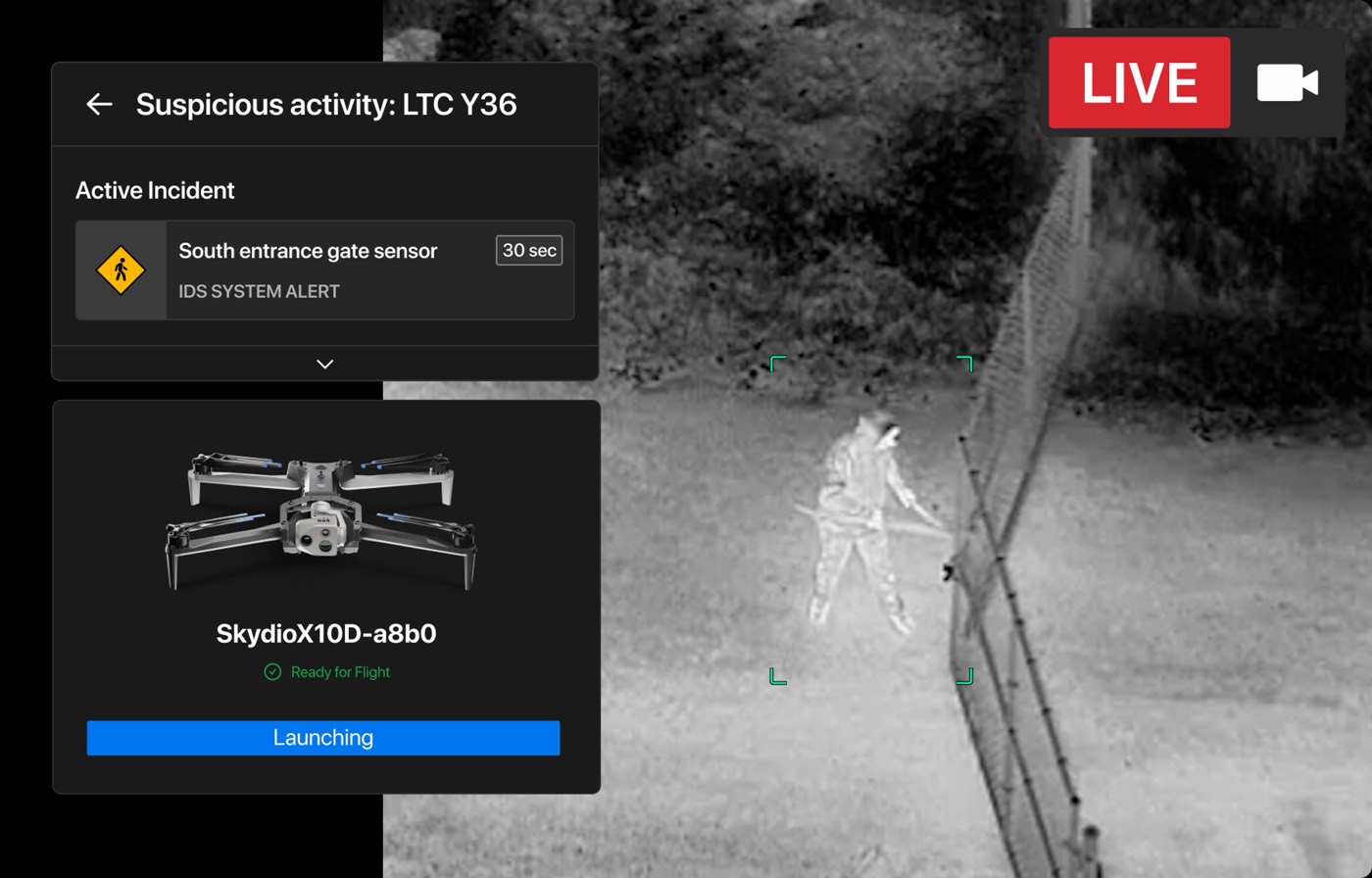
The base and border products are built around one loop: a sensor fires, a dock launches, an operator claims it, and the response is closed out. Each step has its own card.
Sensor alert card IncidentCard
- Title = event type + location code
- Source row: sensor name, integration (IDS SYSTEM ALERT), seconds since it fired
- Expands to show more sensor hits for the same incident
Dock launch card LaunchCard
- Aircraft render + ID, preflight state in green
- Full-width blue CTA that becomes a live state label (Launching)
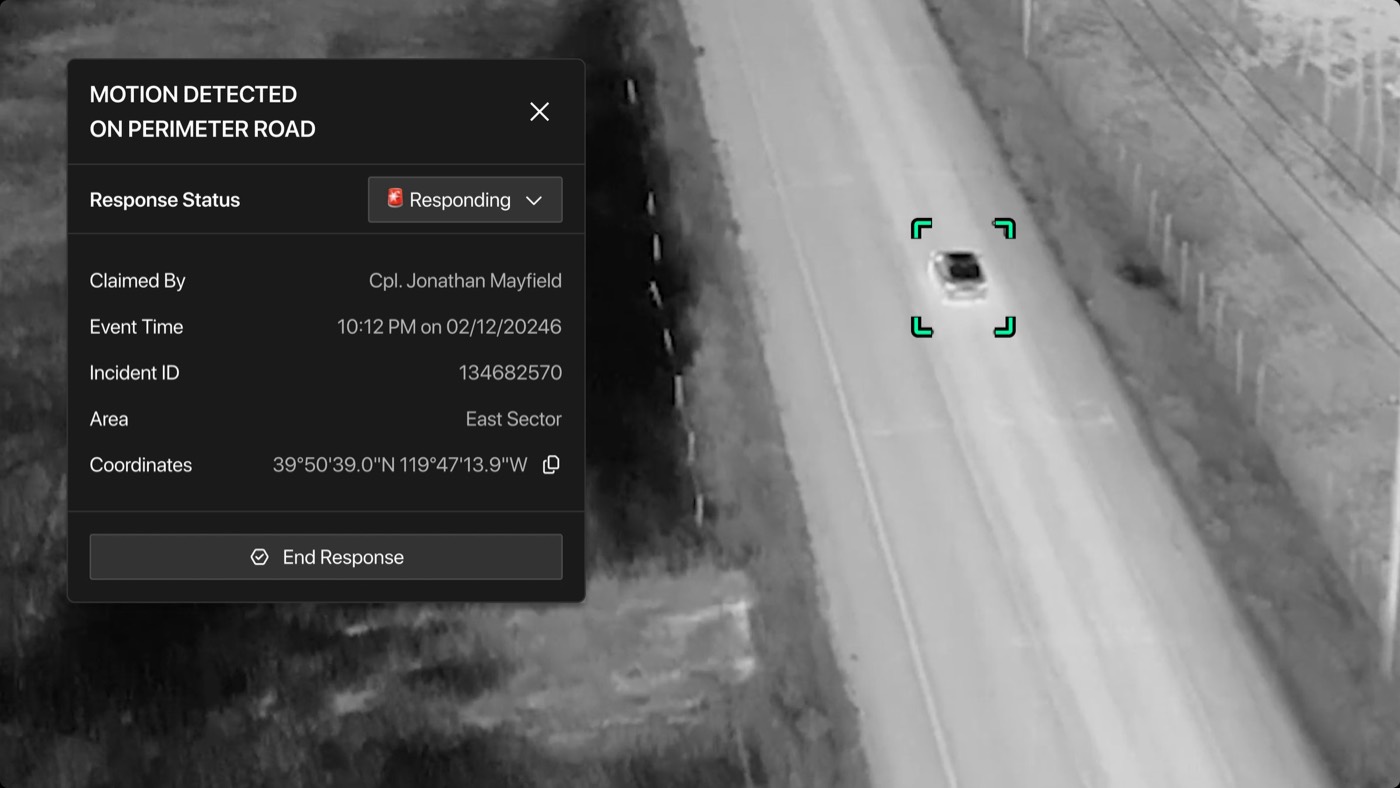
on perimeter road
- Claimed By
- Cpl. Jonathan Mayfield
- Event Time
- 10:12 PM on 02/12/2024
- Incident ID
- 134682570
- Area
- East Sector
- Coordinates
- 39°50'39.0"N 119°47'13.9"W
Incident detail IncidentDetail
- Caps title; status select at top so the state is the first thing you change
- Key-value list: who claimed it (with rank), time, ID, area, copyable coordinates
- Neutral, deliberately quiet "End Response" closes the loop
Live indicator & inline alert LiveTag / AlertToast
- Oversized LIVE + camera glyph on shared/broadcast views
- Toast pairs the event diamond with a short location line (pattern inferred from the cards above)
10Design principles
Twelve principles read off the components above, each written as rules a UI generator can follow and a linter can check. MUST and NEVER are hard constraints. CHECK is how to test a generated screen against the principle.
Color is a signal, never decoration
Every saturated hue in the product stands for an operational meaning. There is no brand accent in the product chrome. The fewer colors on screen, the faster an anomaly shows.
- MUSTPick every non-neutral color from the six signal tokens, each by its meaning: action-blue, alert-red, ok-green, reticle, focus-amber, poi-purple.
- NEVERUse a signal color for decoration, branding, charts or empty states.
- CHECKEvery colored element can be traced to an entity state in the ontology.
Red is reserved for stop, hostile, and live
Pause, STOP, return-to-home, LIVE and hostile markers are the only red elements. Because red is scarce, the safe-stop control is always the easiest thing to find.
- MUSTRender a filled-red stop or return control inside every container that shows a flying aircraft.
- NEVERUse filled red for a destructive admin action such as delete or archive. Those use neutral buttons with a confirmation step.
- CHECKCount of filled-red elements per aircraft container is at least 1. Count of red elements not mapped to stop, hostile, live or alert is 0.
One entity, one identity, every pane
A selected aircraft is amber on the map, amber-bordered in the feed grid and outlined in the list, all at once. The operator never has to match names across panes.
- MUSTBind selection to the entity ID, not the view. Selecting it anywhere applies the focus token everywhere it is rendered.
- MUSTKeep one entity in focus at a time per operator.
- CHECKFor any focused ID, every rendering of that ID carries the focus treatment.
Layout follows the response loop
Desktop columns run left to right in the order of a response: triage the list, place it on the map, act in the feed. Each command bar attaches to the view whose scope it acts on.
- MUSTOrder desktop panes as Nav → List (triage) → Map (locate) → Feeds (act).
- MUSTPut fleet-wide commands under the map, and per-aircraft commands inside that aircraft's feed.
- NEVERPut a command that affects many aircraft inside a single aircraft's container.
Lead with state; the system is already working
Most words in the UI describe what the autonomy is doing: Launching, Relief In Progress, Every 30 mins, Upcoming 11:33. The operator supervises more than they fly.
- MUSTShow the current state as the first readable element of every entity card.
- MUSTGive time-bound states their time: a start time, an elapsed time or an ETA.
- CHECKNo entity card renders without a state badge or state label.
Machine data looks like machine data
Three type voices tell the operator who is speaking. Monospace means the aircraft is measuring something. Uppercase means the system wrote it. Sentence case means a person named it.
- MUSTSet telemetry values in mono with explicit units (FT, MPH, %, MHz, °).
- MUSTSet system-generated titles in caps: alert types, work orders, TAK messages.
- NEVERShow a measurement without a unit, or a coordinate without its format (MGRS or lat/long).
Speak the destination's dialect
Anything that lands in TAK uses TAK's own look: MIL-STD-2525 affiliation symbols, MGRS grids and mono caps. It stays readable to a soldier who has never used a Skydio product.
- MUSTRender any entity that is shared over CoT with standard 2525 shape and fill.
- NEVERRestyle, recolor or round off affiliation symbols to match the Skydio look.
- CHECKContext = TAK switches type to the mono caps voice and location to MGRS.
Density changes by device; vocabulary doesn't
The desktop labels everything. The controller collapses the same functions into edge rails and flyouts sized for gloves and sunlight. HAL, VIO, GPS and MGRS mean the same thing on both.
- MUSTOn the controller, place tools on the left and right screen edges, keep touch targets at 44px or more, and leave the video center clear.
- MUSTUse one shared abbreviation dictionary across both surfaces.
- NEVERIntroduce a control on one surface that does the same job under a different name on the other.
Overlays carry their own contrast
Maps and video are unpredictable backgrounds: desert, snow, thermal white, night. Every overlay brings its own contrast with a white stroke, a dark scrim or a dark chip.
- MUSTGive map symbols a 2px or wider white or black stroke, and put text over imagery on a scrim of at least 55% opacity.
- NEVERRely on fill color alone to make a symbol stand out from imagery.
Every alert has a source, an owner, a clock and an end
The base and border products run one loop: a sensor fires, a dock launches, a person claims the incident, and the response is closed. The UI never leaves an alert unowned or open-ended.
- MUSTShow on every Incident: the source integration, the time since it fired, who claimed it, and a close action.
- MUSTMake the response status the first editable field.
- CHECKNo incident can render without an "unclaimed" or "claimed by" value.
Cards share a three-row grammar
Patrol, asset, mission and incident cards all answer three questions in the same order. That lets an operator scan a long list without reading every card.
- MUSTRow 1 holds identity and state. Row 2 holds where it is and what comes next. Row 3 holds who is on it, its health, and counts.
- MUSTPut the state badge top-right and the inline actions bottom or right, in the same place on every card.
Quiet surfaces, sharp edges
Panes separate by stepping the fill, not by drawing borders, and corners stay at 2–4px. Four dense panes read as one calm instrument instead of a wall of boxes.
- MUSTNest surfaces one step lighter per level (surface-0 → 1 → 2 → 3).
- NEVERUse radii above 4px on controls, shadows on in-pane cards, or pill-shaped status badges.
11Product ontology
The things the product is about, what each one means to an operator, how they relate, which states they move through, and which component draws them. A generator should start here: pick the entities a screen is about, then let the ontology choose the components.
| Entity | What it means to the operator | Key attributes | States | Rendered as |
|---|---|---|---|---|
| Place · where the work happens | ||||
| Organizationtenant | The customer program you are working inside, such as a base security office or a border sector. It sets who can see what. | name, logo, deployment (cloud / on-prem) | — | NavRail footer org switcher |
| Sitefacility | A physical place you are responsible for. It is the top-level grouping for patrols and docks. | name, boundary, docks[] | — | Collapsible group header, map extent |
| Sector / Zonearea | A piece of a site with its own owner and patrol cadence. Incidents report where they are by sector. | name, polygon, site | normalalerting | Map polygon, MissionItem sector line, Area row |
| Airspace limitTFR · geofence | A place you may not fly, or may fly only under conditions. It overrides plans. | polygon, altitude cap, window | inactiveactive | Red-hatched map zone, TFR Active badge |
| Assets · what you fly with | ||||
| Docklaunch · charge | A fixed home that launches, recovers and charges an aircraft with no one on site. It is what lets a drone get airborne in under 2 minutes. | name (HAW-Alpha-Dock), site, aircraft, weather | readylaunchingemptyoffline | AssetItem, dock map marker, LaunchCard |
| AircraftX10 · X10D | The drone. It is the one entity that moves, so most of the screen is about where it is, how healthy it is and what it sees. | callsign, battery %, HAL/AGL, speed, heading, link (MH/FUS), nav (VIO/GPS), flight time left | readylaunchingflyingholdingreturningrelieved | DroneMarker, FeedTile, HUD, AssetItem |
| Sensor / Payloadcamera · attachment | What the aircraft can sense or do. Choosing color or thermal, zoom, speaker or light changes what you can learn and how you can intervene. | type, mode (color / thermal palette), zoom, recording | offonrecording | CamStack, ThermalMenu, CaptureRail, AttachmentBar |
| People · who is accountable | ||||
| Operatorpilot · responder | The person accountable. A pilot flies or supervises an aircraft. A responder claims an incident. Rank and name appear because accountability is personal. | name, rank, role, assigned aircraft | availablepilotingresponding | Initials avatar, "Claimed By" row, feed header pilot name |
| Tasking · what you were told to do | ||||
| Work ordertasking ref | The formal request that authorizes a mission, in the vocabulary the unit already uses. | ID (WO 04B-11A), requester, sector | openscheduleddone | MissionItem title prefix |
| Missionpatrol · response · overwatch · relief | A unit of planned work for an aircraft. A patrol is recurring and proactive. A response is triggered by an incident. Overwatch holds on a subject. A relief swaps aircraft without losing coverage. | type, aircraft, route, cadence ("Every 30 mins"), start time | scheduledupcomingactivepausedneeds attentiondone | PatrolCard, OperationItem, MissionItem |
| Routepath | The path a mission flies. Its shape is how operators recognize a mission at a glance. | polyline, waypoints[], altitude | plannedin progress | Map polyline (blue flown, white ahead), schedule thumbnail |
| Waypointstop | An ordered checkpoint. "Next: East Building" tells you where the aircraft is headed. | index, position, action | pendingreached | RouteMarker, card "Next:" line |
| Triggers · why it is happening now | ||||
| Integrationsource system | Another system Skydio listens to or talks to: intrusion detection, video management, CAD, counter-UAS, TAK. It tells you whether to trust a signal and where it came from. | vendor, type, direction (in / out) | connecteddegraded | Source label ("IDS SYSTEM ALERT") |
| Sensor alertevent | A single signal from an integration, such as a gate opening or motion on a road. On its own it is evidence, not yet a decision. | sensor, type, time, position | newgrouped | IncidentCard source row with elapsed time |
| Incidentcase | One or more alerts treated as a single situation that needs a person. This is where accountability attaches. | ID, title, area, coordinates, claimed by, response status | newclaimedrespondingresolved | IncidentCard, IncidentDetail, "!" map marker |
| Perception · what the aircraft sees | ||||
| Streamvideo | The live or recorded view from a sensor. It is the primary evidence, and it can be shared outside the operations center. | aircraft, sensor, live flag, share link + expiry | liverecordingsharedended | FeedTile, LiveTag, StreamShare |
| DetectionAI | Something the onboard AI found, such as a person, vehicle or animal. It is cheap and frequent, so the UI counts detections more than it announces them. | class, confidence, box, time | seendismissedpromoted | Reticle, class tag, patrol card counts |
| Subjecttrack | A detection a person decided matters. It gets followed, labeled and handed off between aircraft. | class, affiliation, track mode (track / follow), owner aircraft | trackinglosthanded off | BoundingBox, Shadow flyout, amber focus |
| Marker (CoT)shared point | A point you share with your whole force over TAK. It becomes part of everyone's common picture. | affiliation (hostile / friend / unknown / neutral), MGRS, author | localpublishedstale | CoTMarker, GridReadout |
State machines
Any flying state can jump to paused / holding through the red stop control (P02). Relief happens before battery reserve runs out, so the subject stays covered.
needs attention is an overlay state, not a step. An active airspace limit (TFR) or a failed checkpoint lifts the mission to the top of the list with a red stripe.
New incidents dispatch a response mission from the nearest ready dock. They cannot be resolved without an owner (P10).
Each step needs more human judgment and reaches more people: from the AI, to the operator, to the unit, to the whole force on TAK.
Relationships, read as sentences
12Generation contract
How a UI generator for Skydio can use the three layers together. The ontology says what is on screen, the component library says how each thing is drawn in each context, and the principles are the checks a generated screen has to pass. The same model ships as skydio-ontology.json next to this page. The components live in one shared library, Skydio UI Kit, and run as a live application in Skydio Live Ops.
1 · Resolve a prompt into entities and context
Every request becomes a set of entity instances, a surface (desktop or controller), a context (list, map, feed, TAK), and an operator task.
prompt  "Gate sensor fired at night, show me the response"
surface desktop
task    respond
entities
  Incident    { state: "new", source: "IDS", area: "East Sector" }
  SensorAlert { sensor: "South entrance gate", age_s: 30 }
  Dock        { name: "HAW-Alpha-Dock", state: "ready" }
  Aircraft    { callsign: "X10D-a8b0", state: "launching" }
  Stream      { sensor: "thermal", live: true }
  Detection   { class: "person" }
2 · Map each entity × context to a component
The ontology's render table picks the component. The layout principle (P04) picks the pane.
list  Incident(new)        → IncidentCard  + SensorAlert row
list  Dock+Aircraft        → LaunchCard    ("Launching", blue CTA)
map   Incident             → EventMarker   ("!", red diamond)
map   Aircraft(launching)  → DroneMarker   (focus: amber)
feed  Stream(thermal,live) → FeedTile      + HUD.compact + LiveTag
feed  Detection(person)    → Reticle       (mint brackets)
bar   Aircraft[]           → FleetActions  (Pause · Descend · Return)
3 · Lint the result against the principles
Hard rules fail the generation. Soft rules produce warnings a designer reviews.
P02 aircraft container has filled-red stop ............ pass
P03 X10D-a8b0 focus applied in list, map, feed ......... pass
P05 every card leads with state ......................... pass
P06 "481" shown without unit in readout ................ FAIL
P10 Incident has source, age, owner, close ............ WARN owner = unclaimed
P12 badge radius 2px, no card shadows ................... pass
4 · What the generator should never invent
These are the places where generated UI is most likely to go wrong for this domain.
- new signal colors, or a brand accent in product chrome
- restyled MIL-STD-2525 symbols
- a flying aircraft with no stop control in view
- telemetry without units, or coordinates without a format
- an incident with no owner and no way to close it
- controller tools placed in the video center
- names for the same function that differ between surfaces
Built from public marketing screenshots on skydio.com. Colors, sizes and type are approximations. Component names, the ontology and the principles are an outside reading of the product, not Skydio's internal model. People, callsigns and IDs are copied from Skydio's own sample data.